
2D vs 3D Motion Capture: What Changes When You Add Cameras
A skeleton drawn on a phone video and a 3D motion capture trial can look alike on screen. Underneath, they are different measurements. This guide explains why, with the geometry behind it, and ends with a plain checklist for when 2D is enough and when it is time to consider 3D.
1. Projection: why one camera loses depth
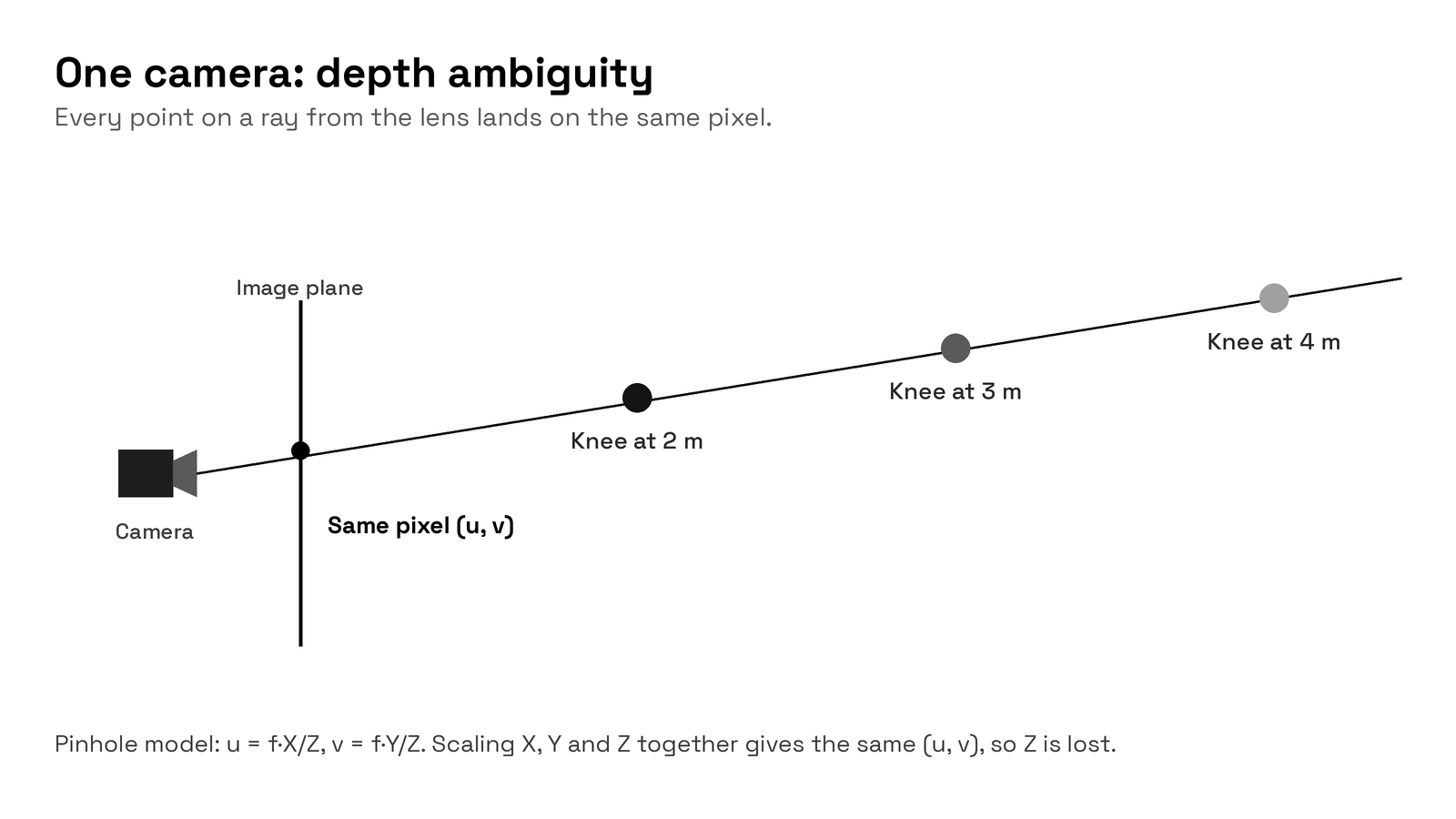
A camera is, to a good approximation, a pinhole: light from a point in the room passes through the lens centre and hits the sensor. In camera coordinates, a point at (X, Y, Z) lands on the image at
u = f · X / Z and v = f · Y / Z
where f is the focal length and Z is the distance from the camera. Multiply X, Y and Z by the same number and u and v do not change. In plain language: every point on the same line of sight (a ray) lands on the same pixel. A knee 2 m away and a knee 4 m away on that ray look identical.
Single-view pose models, including popular open-source libraries, can output a depth value per landmark. That depth is inferred from typical body proportions and training data. It is a prior, not a measurement, and it cannot separate two real movements that produce the same pixels.
2. Triangulation: how several cameras recover depth
With two or more cameras that see the same moment, each camera gives one ray to the joint. If the cameras' positions are known, those rays cross (or nearly cross) at the joint's 3D position. This is triangulation. In practice the rays never meet perfectly because of detection noise, so software finds the point that best fits all views, typically by least squares. The leftover mismatch, called reprojection error, is a useful quality check: it tells you how well the 3D point explains what each camera saw.
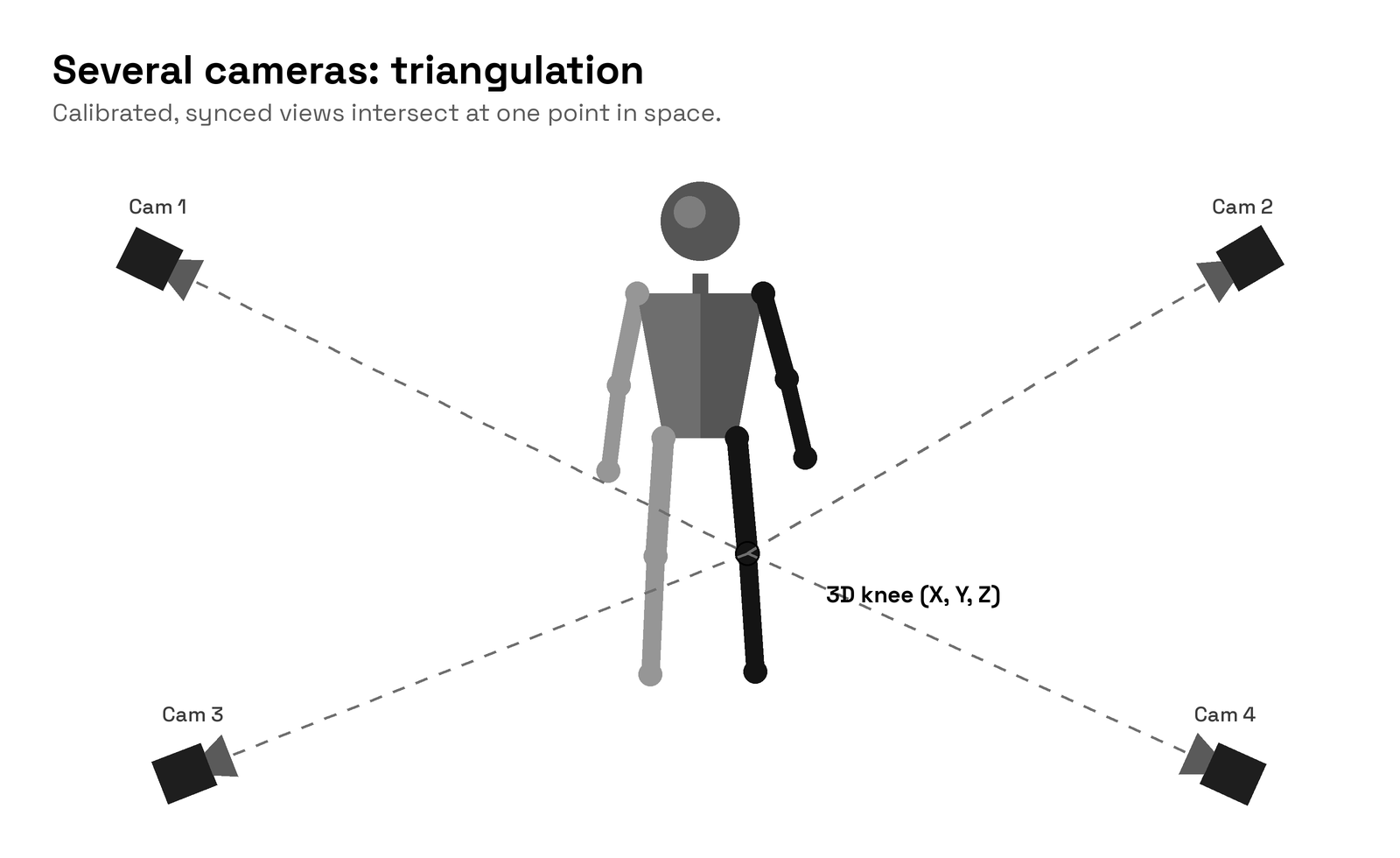
Geometry matters too. Rays that meet at a wide angle pin a point down well. Two cameras placed almost side by side give a long, thin zone of uncertainty along the viewing direction. Spreading cameras around the subject helps.
3. Calibration: intrinsic and extrinsic
Triangulation only works if the software knows two things about every camera.
- Intrinsic calibration describes the camera itself: focal length, the image centre and lens distortion (the bending that makes straight lines curve near the edges). It is measured by filming a ChArUco board, a checkerboard with printed coded markers, from several angles. The known square size and the uniquely identifiable corners let software solve for the lens model.
- Extrinsic calibration describes where each camera sits and points relative to the others, in one shared coordinate system. A calibration box with known geometry, seen by all cameras, ties the views together and sets the origin, the axes and the scale in real units.
Without intrinsics, rays point in slightly wrong directions. Without extrinsics, there is no shared space for them to meet in. Two phones filming the same jump are still two separate 2D videos until both steps are done.
4. Occlusion and self-occlusion
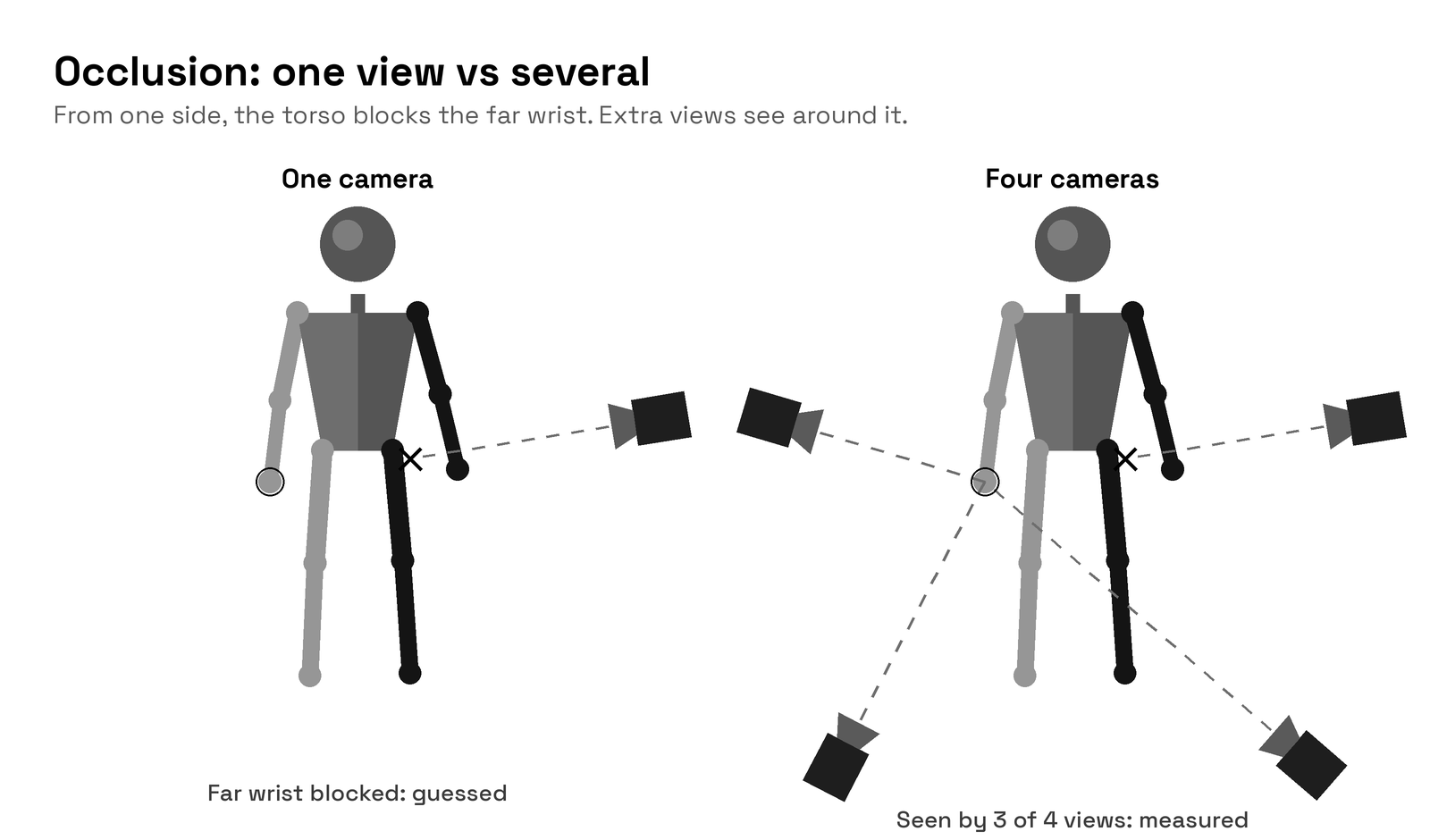
Occlusion is when something blocks the camera's view of a landmark. Self-occlusion is when the body blocks itself: the far arm behind the torso, or one leg crossing the other in gait. A single camera has to guess hidden joints. With several cameras around the subject, a joint hidden from one view is usually visible to others, and triangulation still works from the views that see it.
5. Out-of-plane error: the maths of a tilted camera
2D joint angles assume the movement happens in a plane parallel to the image. When the camera is rotated away from that, angles are distorted. A simple model shows how much.
Take a knee flexion of true angle α in the sagittal plane, with the thigh vertical and the shank tilted back by α. Rotate the camera by θ around the vertical axis, away from a perfect side-on view. The vertical component of the shank is unchanged, while its horizontal (forward-back) component is foreshortened by cos θ. So the angle the camera sees is
α′ = atan( tan α · cos θ )
| True knee angle α | θ = 15° | θ = 30° | θ = 45° |
|---|---|---|---|
| 30° | 29.1° | 26.6° | 22.2° |
| 45° | 44.0° | 40.9° | 35.3° |
| 60° | 59.1° | 56.3° | 50.8° |
Worked example: α = 45°, θ = 30°. tan 45° = 1, cos 30° = 0.866, atan(0.866) = 40.9°. A camera only 30° off side-on under-reads that knee by about 4°. At 45° off, the error passes 9°.
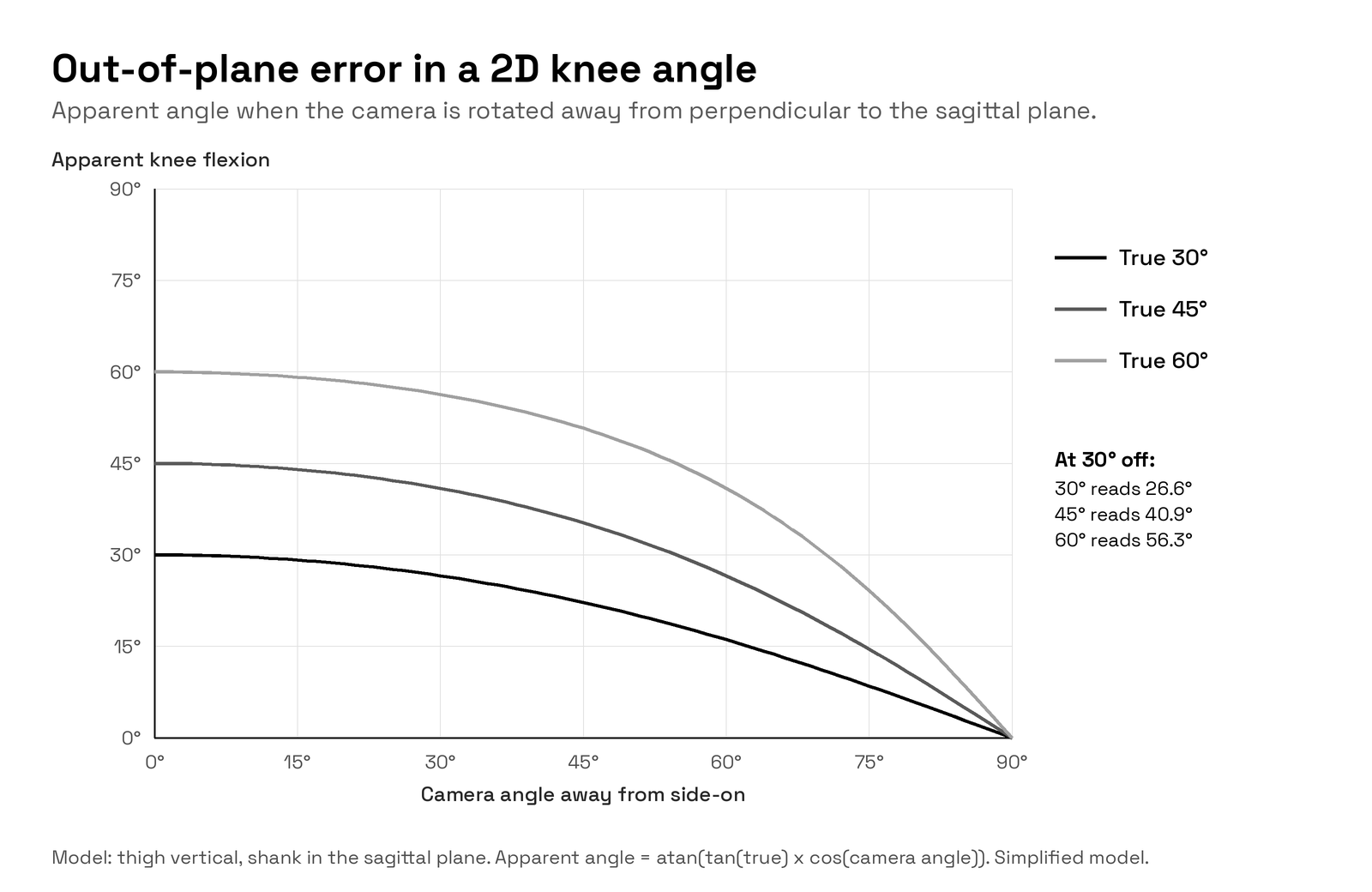
This is a deliberately simple model. Real error also depends on the thigh's tilt, the subject's position in the frame, lens distortion and the subject turning during a trial. The direction of the effect holds: the further the view is from perpendicular, the less you can trust a 2D angle.
6. Planes of motion: sagittal, frontal and transverse
- Sagittal plane (side view): forward and back motion, such as knee and hip flexion in walking or squatting. A well-placed side camera can give reasonable 2D estimates here.
- Frontal plane (front view): side-to-side motion, such as knee valgus (knee moving inward) or pelvic drop. These angles are often small, so a few degrees of projection error can be a large share of the signal.
- Transverse plane (top view): rotation, such as hip internal rotation or trunk rotation. Rotation happens largely toward and away from any single camera, which is exactly the depth direction one camera cannot see.
Real movements combine all three. A cut, a throw or a step-down mixes flexion, adduction and rotation at once. Separating them requires a joint orientation in 3D, which requires 3D positions.
7. Synchronization and shutter type
Triangulation assumes every camera captured the same instant. If cameras are out of sync, a fast-moving joint is in different places in each view, and the rays no longer meet. As a rough guide: a foot moving at 5 m/s travels 2.5 cm in 5 ms and 17 cm in one frame at 30 fps, so both frame timing and frame rate matter.
Rolling shutter sensors, common in phones, read the image line by line, so the top and bottom of a frame are captured at slightly different times. Fast limbs can appear bent or skewed. A global shutter exposes the whole sensor at once, so each frame is one moment in time.
8. Exports: what comes out
- CSV: plain tables of landmark coordinates or angles per frame. Easy for spreadsheets and scripts.
- BVH: a skeleton hierarchy with joint rotations, widely used in animation and character pipelines.
- C3D: the long-standing biomechanics format for 3D point trajectories and analog data. OpenSim-compatible C3D lets you take a trial into musculoskeletal modelling.
A 2D workflow typically produces a video with an overlay and pixel coordinates. A 3D workflow produces trajectories in real units in a shared coordinate system.
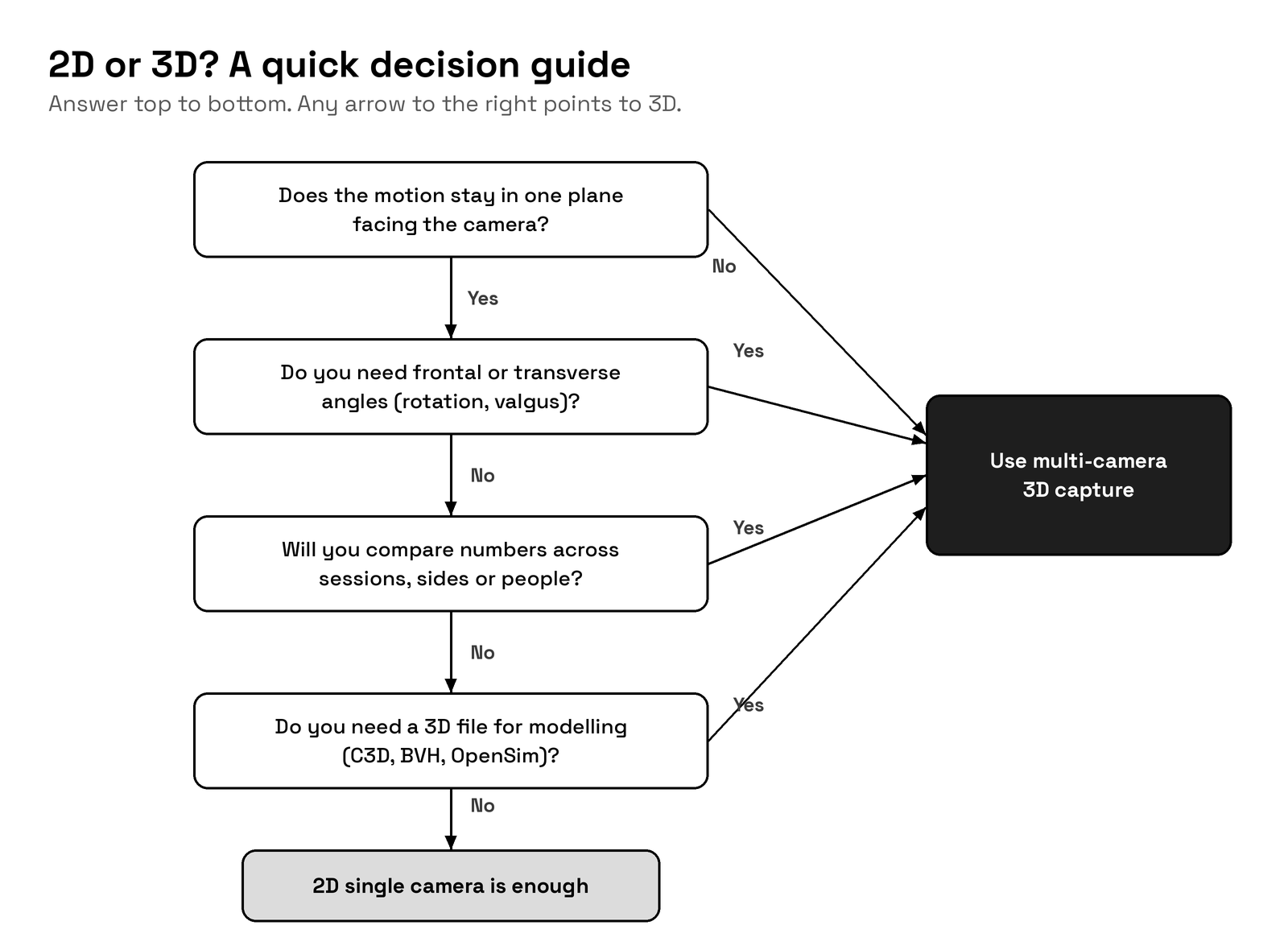
9. When to use 2D and when to consider 3D
| Criterion | 2D single camera is fine | Consider multi-camera 3D |
|---|---|---|
| Plane of motion | Mostly one plane, camera perpendicular to it | Multi-planar or rotational movement |
| Angles needed | Sagittal flexion and extension, rough | Frontal and transverse angles, small angles |
| Purpose | Visual feedback, coaching cues, content | Numbers compared across sessions, sides or people |
| Subject position | Stays at a fixed spot and orientation | Turns, travels, or moves toward the camera |
| Occlusion | Landmarks of interest stay visible | Limbs cross or hide behind the body |
| Output | Video and overlay | CSV, BVH or C3D trajectories for modelling |
| Setup | Seconds, any phone | Several synced cameras plus calibration |
Use 2D when
- You need quick visual feedback during a session.
- The task is essentially planar and you can place the camera square to it.
- You are looking for an obvious pattern, not a number you will track.
- You are creating teaching or social content where the picture is the point.
- Equipment or space rules out more than one camera.
Consider 3D when
- The movement includes rotation, side-to-side motion or changes of direction.
- You need frontal or transverse angles, or small differences between left and right.
- You will compare results over weeks, between athletes or before and after a programme.
- Limbs cross, or the subject turns during the trial.
- You want trajectories for analysis or modelling software such as OpenSim.
FAQ
Can a single camera produce 3D motion capture?
Single-view models can estimate a 3D pose, but the depth is inferred, not measured. For measured depth you need several calibrated, synchronized views.
How much error does a tilted camera add to a 2D angle?
In the simplified model above, a 45° knee filmed 30° off side-on reads about 40.9°, and about 35.3° at 45° off. Real error varies with posture and setup.
What is the difference between intrinsic and extrinsic calibration?
Intrinsic calibration models each camera's lens, using a ChArUco board. Extrinsic calibration finds where the cameras are relative to each other, using a calibration box, so their views share one coordinate system.
Why does global shutter matter?
It captures the whole frame in one instant, so fast limbs are not skewed and every camera's frame represents one moment.
How many cameras do I need for 3D?
At least two for triangulation. More cameras spread around the subject reduce occlusion and improve accuracy. Four is a common starting point for one person.
Is 3D motion capture a diagnosis?
No. It is a measurement. Interpretation, especially when it informs care, belongs with a qualified professional.
Where NODAL M1 fits
NODAL M1 is a portable multi-camera 3D motion capture system in a case, in 4, 6 or 8 camera kits. Cameras record at 30 to 120 fps with a global shutter and stay synchronized to under 5 ms. Calibration uses a ChArUco board for intrinsics and a calibration box for extrinsics, and trials export as CSV, BVH and OpenSim-compatible C3D. If your questions have moved past what one camera can answer, see it at nodal3d.com.